





Facebook Facebook Facebook Facebook

ANDROID

Showing posts with label Android apps. Show all posts

Design and simulate electronic circuits on your Android Mobiles

0 comments


Design and simulate electronic circuits!

All joking aside, this time you will understand how electronic circuits work.
"I stumbled upon some serious gold" - GeekBeat.tv
"A fully realized circuit simulator" - EDA360 Insider
Build any circuit, tap play button, and watch dynamic voltage, current, and charge animations. This gives you insight into circuit operation like no equation does. While simulation is running, adjust circuit parameters with analog knob, and the circuit responds to your actions in real time. You can even generate an arbitrary input signal with your finger!

That's interactivity and innovation you can't find in best SPICE tools for PC like Multisim, LTspice, OrCad or PSpice (trademarks belong to their respective owners).
EveryCircuit is not just an eye candy. Under the hood it packs custom-built simulation engine optimized for interactive mobile use, serious numerical methods, and realistic device models. In short, Ohm's law, Kirchhoff's current and voltage laws, nonlinear semiconductor device equations, and all the good stuff is there.

Growing library of components gives you freedom to design any analog or digital circuit from a simple voltage divider to transistor-level masterpiece.

Schematic editor features automatic wire routing, and minimalistic user interface. No nonsense, less tapping, more productivity.

Simplicity, innovation, and power, combined with mobility, make EveryCircuit a must-have companion for high school science and physics students, electrical engineering college students, breadboard and printed circuit board (PCB) enthusiasts, and ham radio hobbyists.

Free version has limited sandbox area, but it can still impress you. If you need a larger playground, a full version is available. The full version will employ all of your imagination, and all the screen area of your tablet.

Thanks to Prof. N. Maghari for technical discussions, feedback, and help with designing circuit examples.

Features:
+ Animations of voltage waveforms and current flows
+ Animations of capacitor charges
+ Analog control knob adjusts circuit parameters
+ Automatic wire routing
+ Oscilloscope
+ Seamless DC and transient simulation
+ Single play/pause button controls simulation
+ Saving and loading of circuit schematic
+ Mobile simulation engine built from ground-up
+ Shake the phone to kick-start oscillators
+ Intuitive user interface
+ No Ads

Components:
+ Sources, signal generators
+ Controlled sources (VCVS, VCCS)
+ Resistors, capacitors, inductors, transformers
+ Potentiometer, lamp
+ Switches, SPST, SPDT
+ Diodes, Zener diodes, light emitting diodes (LED)
+ MOS transistors (MOSFET)
+ Bipolar junction transistors (BJT)
+ Ideal operational amplifier (opamp)
+ Digital logic gates, AND, OR, NOT, NAND, NOR, XOR, XNOR

Next:
+ More components
+ Zoom
+ Display of current waveforms

Download link
 EveryCircuit

EasyMoney - Manage your personal finance anytime anywhere using your Android Device

0 comments

Manage your personal finance anytime anywhere with EasyMoney expense manager!
EasyMoney is the #1 money manager app that combines an expense manager, a bill reminder, a checkbook register and a budget planner!

EasyMoney expense manager provides a rich, detailed window into your personal finances and daily money management needs. 

Track and manage daily expenses quickly & easily! Business expenses, personal expenses, travel expenses etc can all be managed rapidly using EasyMoney expense manager's simple and intuitive user interface. 

Interactive reports & graphs let you analyse income, expenses, cash flow and balance over various date ranges and accounts.

To more effectively manage your budgets, you need a budget planner that makes keeping track of your expenses fun and easy. The integrated budget manager within EasyMoney lets you set monthly budgets on specific accounts and/or categories and monitor them via color-coded budget health bars that warns you when you are about to exceed your budgets.

Also integrated is a bill reminder that helps you avoid nasty late fees by issuing you timely reminders to pay your bills. You can even take a picture of your bills or invoices to keep a digital record.

Full list of extensive features include:
-Split transactions supported for more detailed income & expense management
-Export captured data as QIF & CSV to desktop money managers (eg. Quicken) for expense reporting etc.
-Includes a Home Screen Widget for even faster expense management & tracking. Add transactions straight from the home page once you enable the widget - great for daily expense tracking!
-Receive notifications of upcoming and overdue bills - for both one-time payments as well as recurring bills
-Set monthly budgets on specific accounts and/or categories and monitor them via color-coded budget health bars
-Fully customizable income and expense categories for more accurate budget planning.
-Take Photos of Bills & Receipts
-Integrated Checkbook Manager
-Track and manage expense and income for multiple accounts in multiple currencies
-Setup repeating transactions
-Support transfers between accounts
-Lock application using a 4-digit security pin
-Backup data onto SD card
-Daily automated backup creation
-30 days free trial!

EasyMoney was included in LifeHacker Magazine's list of the top 5 best mobile personal finance tools in January 2011. 

The recent publication - Amazing Android Apps for Dummies - also included EasyMoney as a featured personal finance application.

This app is not just for money lovers! Whether you are looking for a better daily expense manager or trying to stay out of debt and be money wise, EasyMoney is definitely the ideal tool to stay on top of your finances.

Download link

Stock CM9 Dark Holo Themed MMS - Free Download

0 comments


This is a stock MMS application for CM9. The only change is that it is dark holo themed instead of light.
This will not work on TouchWiz without modification or running it alongside of your stock mms application.


 Instructions:
It's a system app. Use a root explorer to move the application into your system/app directory, or, even easier, push it to /system/app with adb:

Code:
adb push Mms.apk /system/app
That's all there is to it.

 Downloads :

MMSb.apk
Mms.apk


Change your Android Mobile status bar using this simple Application

0 comments


Anotify,No more Boring Status bar,Fancy Status bar for your phone.

Anotify: No more boring Status Bar!

Give your phone fancy status bar.

Anotify is An Android application to give your device status bar a fancy look by adding your favorite icons in status bar.

Icons Included:
*Android
*Windows
*Batman
*Superman
*Spiderman
*US flag
*UK flag
*Indian flag
*Mario
*ferrari
*Ironman
and many more.....
Updated version with more icons will be available soon.


Download link
Anotify

Firefox for Android - Now available for ARMv6 officially

0 comments


Help refine and polish the newest features almost ready for prime time. With Firefox Beta, you get to test the latest performance, customization and security enhancements before they make it to our next version. Have an impact by helping to put the finishing touches on features and functionality.


Visit https://bitly.com/FXinput to report issues or share your suggestions so we can make Firefox for Android more awesome. Find a bug? Report it at http://mzl.la/android_bugs.

Want to know more about the permissions Firefox requests? http://mzl.la/FirefoxPermissions

See our list of supported devices and latest minimum system requirements at https://www.mozilla.org/mobile/16.0beta/system-requirements/.

ABOUT MOZILLA
Mozilla is a proudly non-profit organization dedicated to keeping the power of the Web in people's hands. We're a global community of users, contributors and developers working to innovate on your behalf. When you use Firefox, you become a part of that community, helping us build a brighter future for the Web. Learn more at mozilla.org.


Download link
Firefox for Android

Super Spy Camera+Pro - APK - Free Download

0 comments


A genuine spy camera has arrived!
This is Super Camera Plus that had overcome the mistakes and weaknesses of the existing spy camera!
People who were embarrassed to take pictures of themselves in public! People who want to secretly keep pictures of your lover!
All those moments that you have to take pictures without anyone knowing, Super Camera Plus will be there for you!
※ This application is not intended for negative use. The developer is not responsible for any negative use.
※ Please use this application positively. ♡

★ Features
1. The shutter doesn’t make any sound.
2. You have the option to set the toast.
3. You have the option to view the preview.
4. Auto-shot takes picture continuously and automatically.
★ How to Use
1. Run the application after downloading it. (You can hold down the Search button to Run.)
2. Press the button to take a picture. (The toast will notify you the location of the saved file.)

★ Configuration
1. Press the Configuration button.
2. You can control the resolution setting and the toast setting and view the preview.
Tip. You can take a picture without anyone knowing if you turn off the toast notification setting and view the preview.
※ If the program turns off or doesn’t work while taking a picture, select the resolution in the configuration and try again. There are some differences among the features of the hardware.

DOWNLOAD LINK
 Super Spy Camera+Pro

TuneWiki Pro - Play your music with scrolling lyrics! - APK - Free Download

0 comments


The only music player where you can get, share and talk about lyrics and music.

TuneWiki Pro is the Ad-Free version of TuneWiki's award winning music player!

* Listen to any music with scrolling lyrics
* Share lyrics from your favorite songs to Facebook & Twitter
* Get lyrics instantly translated into 40+ languages
* Share Photos from your gallery.
* Free, unlimited SongID with synced lyrics
* Discover new music – songs that are being played and recommended by your friends
* Create, manage, and edit playlists
* View and edit detailed tag info for artists, albums and songs
* Supports installation to SD card. Please note that due to restrictions within the Android OS, the widget will be disabled when the app is on the SD card.
*Verizon users, please contact ideas@tunewiki to share your feedback with us vs. writing reviews here so we can discuss.


Download link
TuneWiki Pro

ZANavi for Android - Free opensource offline navigation

0 comments


ZANavi for Android, the completely free and offline Navigation for Android
ZANavi for Android is an open source (GPL) car navigation system for offline Navigation

if you want better quality voice install:
https://play.google.com/store/apps/details?id=com.svox.classic
or
https://play.google.com/store/apps/details?id=com.ivona.tts

based on Navit
Features:
*) works on Ice Cream Sandwich (ICS) (Android 4)
*) support to show GPX files
*) Navigate to target from google maps
*) APP2SD
*) works offline (offline navigation)
*) world overview map
*) tunnels are visible on map
*) bridges visible on map
*) map turns with compass
*) map management (download/update/delete maps)
*) search offline OR online
*) spoken directions in many languages
*) uptodate OSM maps
*) follow mode OSD toggle button
*) oneway arrows [BETA]
*) select your language in the application
*) select search country
*) checksum downloaded mapfiles
*) announcer toggle
*) settings and menus translated
*) map preview on search results
*) aGPS
*) last destination list (bookmarks)
*) add waypoints
*) show waypoints on map
*) configure map data directory
*) full world map download (special donate version!)
*) configure cache size
*) configure font size
*) change search radius for streets in towns
*) free zoom level with pinch zoom
*) enter coordinates (lat,lon) manually
*) switch off mapdisplay (button on right top of screen)

Download link
ZANavi

CyanogenMod 9 Music Player - Free Download

0 comments


Introducing the new CyanogenMod Music app.


Fling up to control your music. Long press for Party Shuffle. Long press for queue.


The app comes with a degree of customization that you won't find in any other Music app, or possibly, in any app. You can shop the Android Market for the currently playing song at the push of a button, share what track you're listening to with all your social outlets, set your favorite song as ring tones, delete unwanted tracks, and search your music from anywhere in the app. 

Rich and custom notifications. Drag & Drop queue and playlist. Custom lockscreen.

The Music app is all about customization. Recently, I've been in the process of integrating a theme engine into the app. The theme engine is thoroughly customizable, allowing designers to touch every UI element in the app. Every drawable (images, backgrounds, etc), all text views, and each seek bars can be themed using the theme engine. I've had a lot fun using it and I'm excited to see what everyone will bring to the table. That being said, I'm also releasing the Music Theme Template for everyone to download today. You can use this to create the themes, and below is an example of what you can do with the theme engine.This is a "Google Music" theme, based on the latest version of the Google Music app. It also doubles as the theme template for the app.


The Music app also comes with native Shake and Flip actions. Quickly play and pause your music by flipping your phone face down, then back up again. You can customize the Shake Action to control you music in more detail. Both of these actions run in the background and can be used no matter where you are in your phone. There are also several other customizations and features that I'm sure you'll find fun and useful. Here are a couple screen shots of the Music app on the new Galaxy Nexus and one of all the new widgets. 


DOWNLOADS :

Manage bloatware on your Android device

0 comments


Use this Android Application "System Tweaks" to manage bloatware.


Enable or Disable system services/apps that some of us consider "bloatware".
Currently supports
[-] RomManager
[-] Live Wallpapers
[-] CM Wallpapers
[-] Google TTS
[-] TVOut (one provided by TeamHacksung)
[-] Gmail (apparently many people don't use it?)
[-] media scanner
[-] phone (some people use their device without calls)
[-] Apollo
[-] DSP Manager
[-] Stock email app
[-] News and weather
[-] GTalk (yeah got few requests on this)
[-] Terminal Emulator
[-] Torch

This app requires ROOT and is tested only on Samsung galaxy SII the international version (I9100). It may work on other devices but I haven't currently tested any other. If it doesn't work please comment on which device and ROM you are using so I may try and find a solution
If you want other services added to this app please use this form:
https://docs.google.com/spreadsheet/viewform?formkey=dHVzSVRzTGJaVGhWRkVsQUd4RVJVMHc6MQ
Then I'll see what i can do


Download link
System Tweaks
 

Locus Pro - MULTI-FUNCTION TOURIST NAVIGATION for Android - APK - Free Download

0 comments


Irreplaceable application for hiking, geocaching and your everyday life.

Locus offers many useful features such as:
- Online maps (Openstreetmap - OSM, Freemap, SHOCart, SmartMaps, MapQuest, Navigasi, Turaterkep, NzTopoMaps, Osmapa.pl, ChartBundle and more)
- Offline maps (Support for formats SQLite, TAR maps, MBT maps, GEMF, RMAP, Orux, SmartMaps)
- Navigation (online calculation)
- Vector maps (MapsForge)
- WMS service
- Track record
- Geocaching
- Integration of Google My Maps (reading and editing)
- Weather service
- Point of interest
- Parking
- POI alert
- Search (by adress, coordinates, contact)
- Custom screen (created by community)
- Integration of GPSies, Breadcrumbs, Trainingstagebuch, Street View and other
- API for developers
- Work with KML, GPX, OpenAir, DXF formats
- Add-ons (GeoGet database, GSAK database, Augmented reality, Foursquare, etc.)


Download link
 Locus Pro
 (Remove license verification using Lucky patcher via 'Custom Patch')

Paper Camera - Cool Android Camera

0 comments


See the world through a novel, original, stylish and captivating lens.

Real time cartoon and painting effects displayed on your camera feed! See the world through a new, original, stylish and captivating lens, have a wonder in your own home and discover how cool is now your world in cartoon!

This is the ultimate collection of cartoon/sketch/comic book/half tone/noir/neon and many other effects painted directly in your camera, no more boring post-effects, it's all real time, you simply won't stop wandering, wherever you are, having a look at things and cartoon-ize them!

You can wave your phone around and see the world change before your eyes, take pictures using any of the stylish cartoon effects or apply them to your existing photos.


Download link
 Paper Camera

HiddenEye - Android App to catch your phone snoopers red handed - Free Download

0 comments


Ever wanted to know who has tried snooping into your phone while you were away. Your friends or family member might have tried to unlock your phone while you are away.

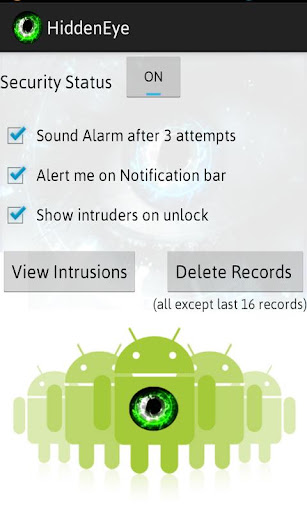
Hidden Eye is a simple app with no frills that will photograph the person when they try to unlock your phone. You can set it to sound your default ringtone when a user tries to unlock your phone without your knowledge.

Sync with Dropbox:
All the images that are captured is stored in "HiddenEye" folder within the DCIM folder on your phone. If you have configured Dropbox to sync your Photos folder, then Hiddeneye pictures will also be synced with your dropbox account.

Worried that your phone does not have front camera. With HiddenEye, now you can know the someone has tried to snoop into your phone. You can also trigger sound if someone is trying to unlock your phone with wrong password thrice. You will see a place holder image instead of a real picture. If you have a front camera, then you will see the real picture of the intruder.

Once you unlock your phone, you will be shown the photographs of the people who tried unlocking your phone in your absence. Sounds interesting ! Try it and let us know if you have any suggestion to improve it further.


How to use ?
* Install and launch the app "HiddenEye"
* Set the Security Status to ON. HiddenEye will prompt you allow it to run as device admin to detect failed password attempts and to photograph the user.
* Activate the device admin for Hidden Eye and thats it. You are now ready for the action.

Note: Make sure that your phone has a front camera and you have enabled screen lock security.

How to uninstall ?
* Launch Hidden Eye and set the Security Status to "OFF"
* Uninstall the app

Deleting Photos:
Clicking "Delete" on the app will delete all photos except last 6 pictures. This will NOT delete photos from the captured images stored in your album. You will have to delete it separately.

Permissions:
CAMERA = Uses the front camera to picture the intruder.
VIBRATE = Notification Alert generated when wrong password is entered.
INTERNET, ACCESS_NETWORK_STATE = Needs to display Ads on the app. App still works without internet.
WRITE_EXTERNAL_STORAGE:Store captured images on the phone, so that its available for you to sync to Dropbox.


Download Link
 HiddenEye

Related Posts Plugin for WordPress, Blogger...
 
Mr. Android © 2011 Design by Army Boots